

10 €28:41
Ma Benz
Suprême NTM
lucas · « pour l'anniv de sam »
accepteroffrirrefuser
Your crowd scans the QR on your booth, picks a track, puts an amount on it. You answer in one tap — “playing it”, “not tonight”, “on the house” — and it shows up on the page still open in their hand.
send & return
scan
The QR sits on your booth. Web page, nothing to install. A track, an amount, and a first name if they care to leave one.
request
On your phone you don't just read “Mask Off”. With a name on it, you read “Marie — Mask Off”. And if Marie already asked tonight, the card says so.
hold
Your lines sit ready in your settings, sorted out before the set. Live, it's one tap — never a keyboard. Nothing has been taken from the card yet.
accept
The money follows your answer, it never leads it. Play it: they're charged. Play it on the house: the track drops, the hold is killed. Pass or let it expire: nothing is taken either.
scan
The QR sits on your booth. Web page, nothing to install. A track, an amount, and a first name if they care to leave one.
request
On your phone you don't just read “Mask Off”. With a name on it, you read “Marie — Mask Off”. And if Marie already asked tonight, the card says so.
hold
Your lines sit ready in your settings, sorted out before the set. Live, it's one tap — never a keyboard. Nothing has been taken from the card yet.
accept
The money follows your answer, it never leads it. Play it: they're charged. Play it on the house: the track drops, the hold is killed. Pass or let it expire: nothing is taken either.
the reassurance
A no isn't silence: the page they kept open flips to declined, carrying your line when you send one. On a track request the card is only authorized — declined, gifted or expired, the hold releases and nothing is taken, with no refund to chase. An amount sent without a track request is different: it goes through right away, there's nothing to accept.
the DJ app
Built for a DJ mid-mix: big buttons, max contrast. Accept, gift or pass in one tap, and a line already written to send back without ever opening the keyboard.
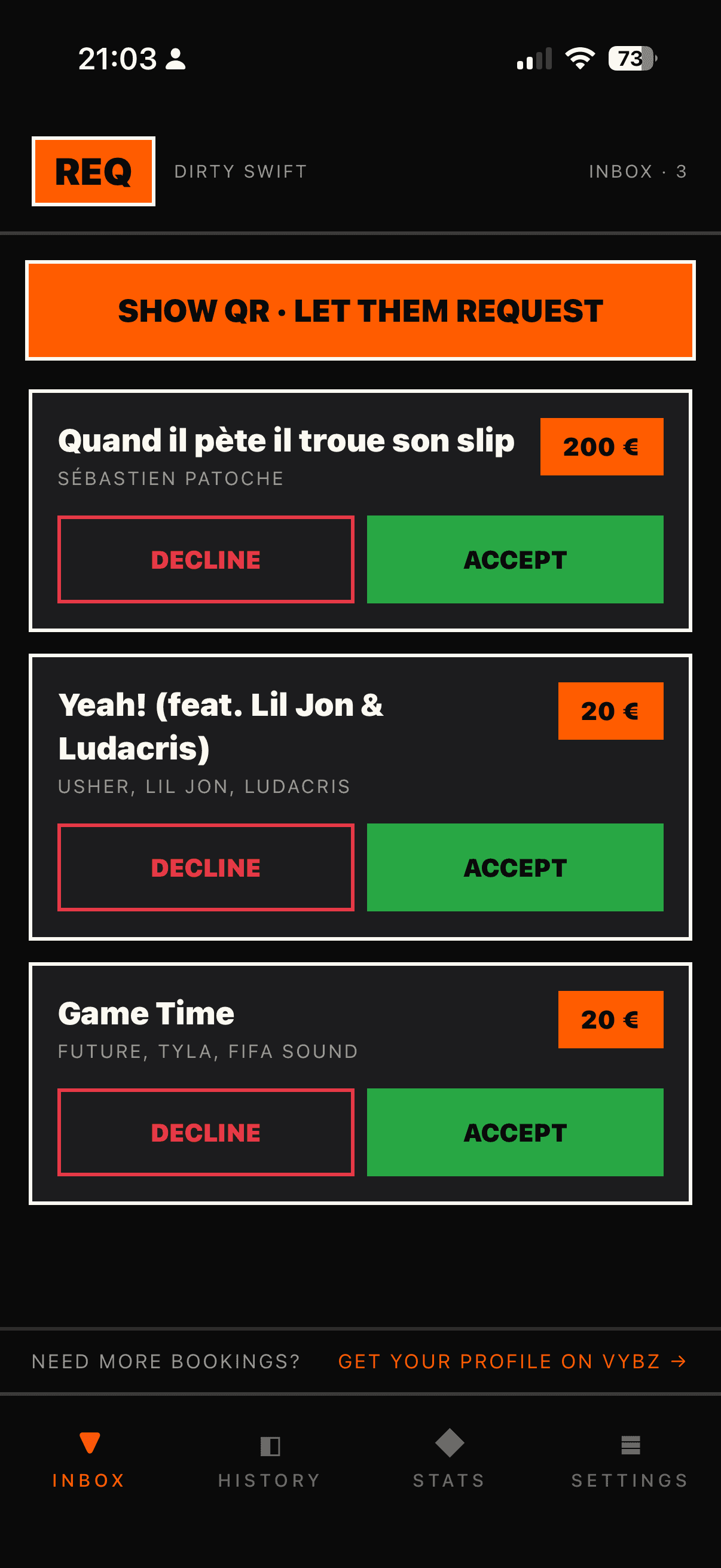
Requests land in real time
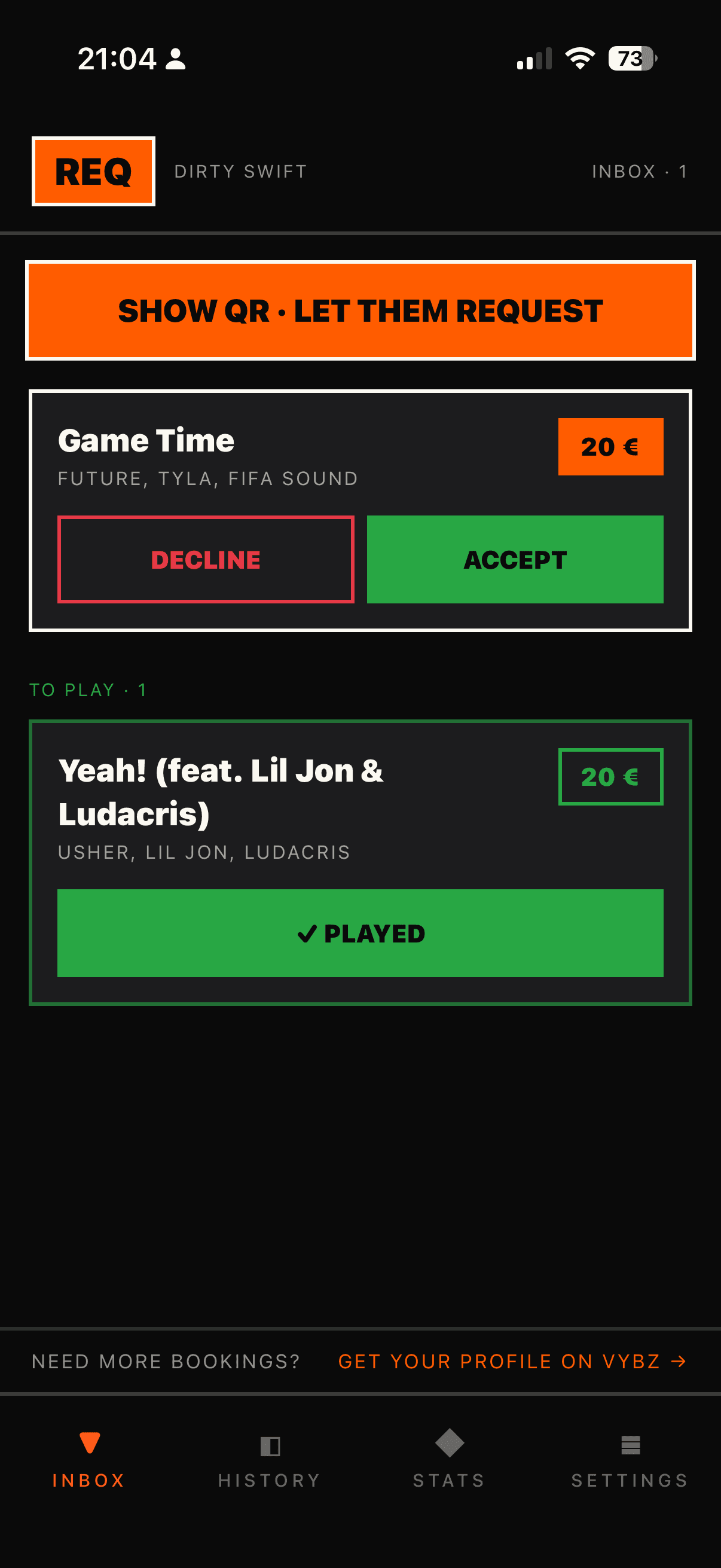
Accept, gift or pass — one tap
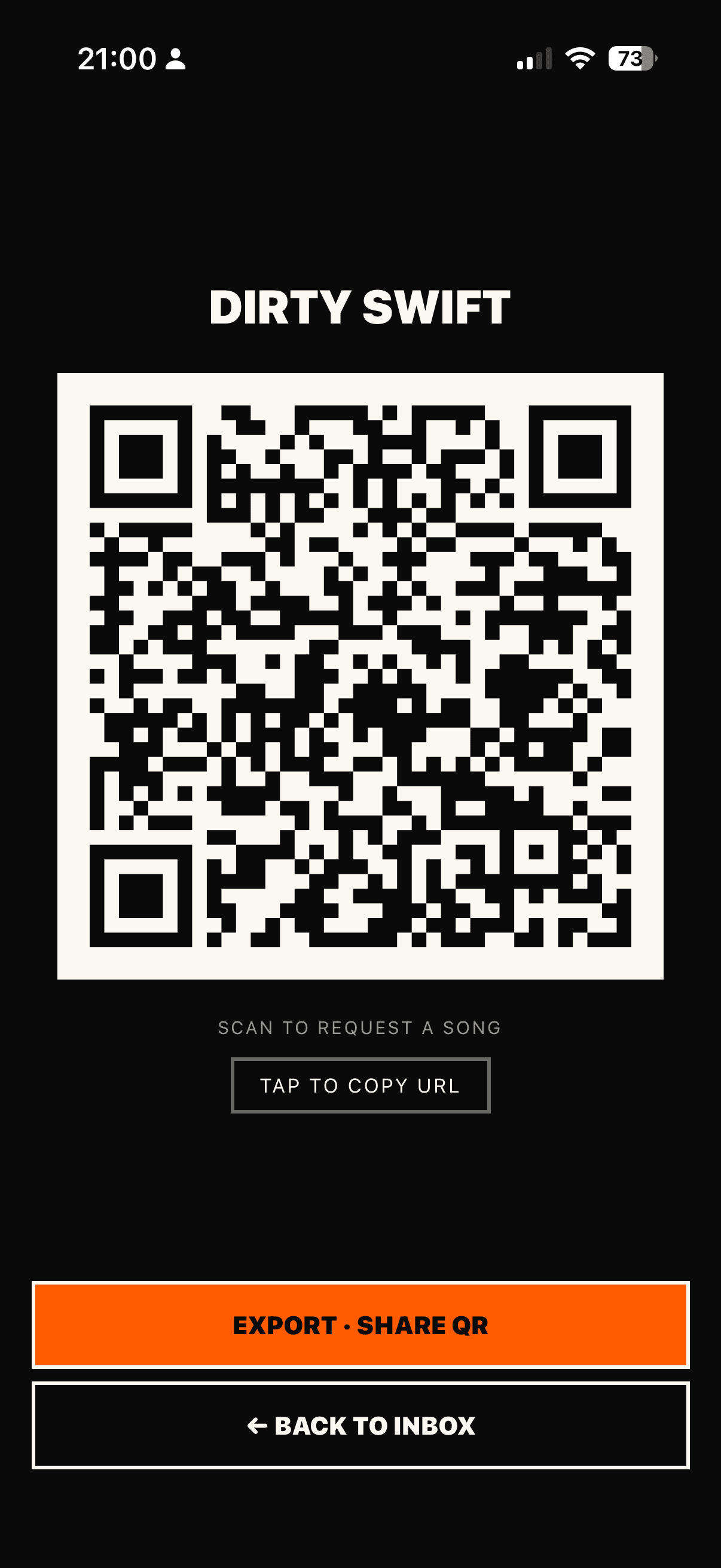
Your QR, ready for the booth
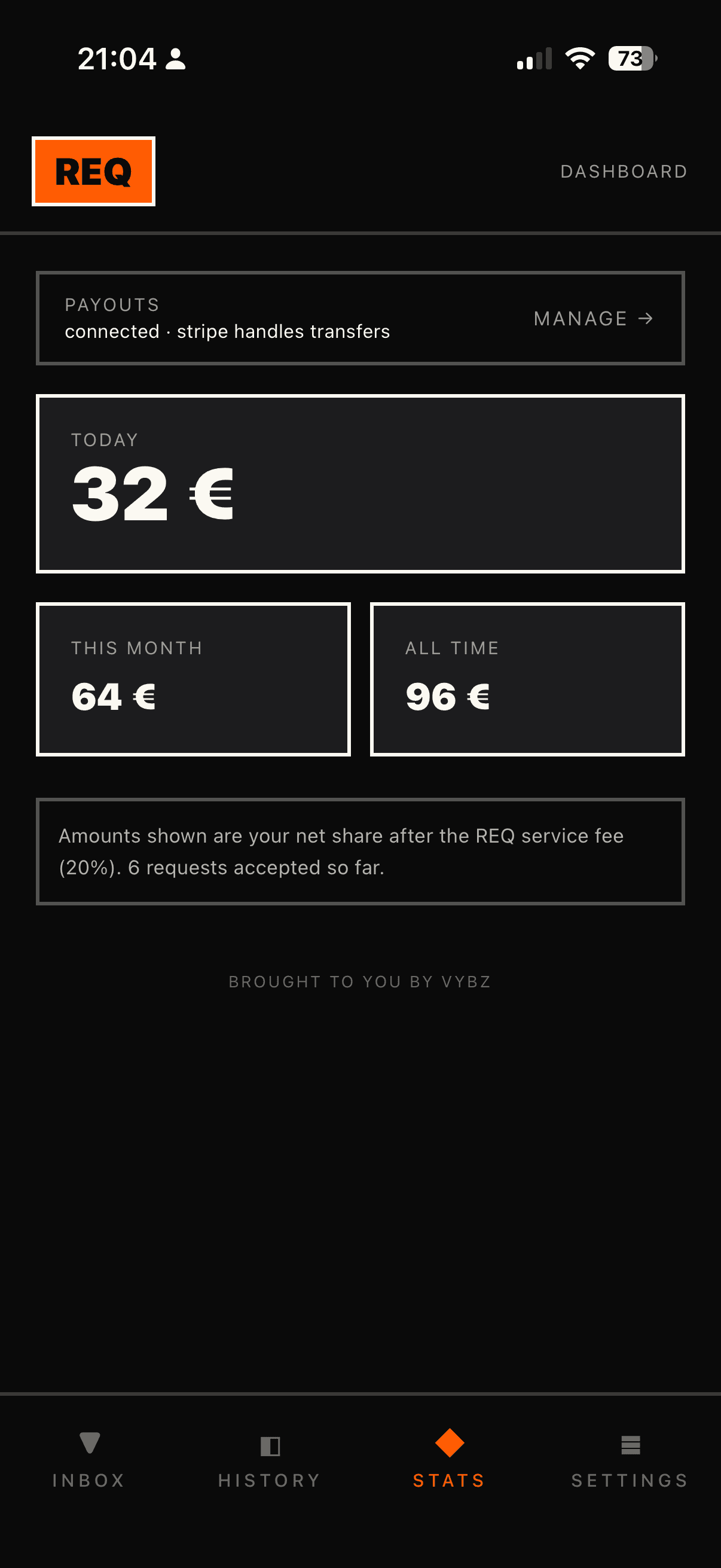
What you pulled in, net
new — version 1.1
Until now REQ carried a title and an amount. Someone asked, then waited in the dark. This version gives them back a name, a sentence, and an answer.
The request arrives with the person's first name and, if they left one, the word they wrote. You no longer read "€5 · Mask Off", you read Marie telling you it would make her night. A marker flags the ones who already came up tonight, and a countdown tells you how long before the authorization releases itself.
The message caps at 140 characters, there is no thread, and a filter blocks abuse before a payment even exists.
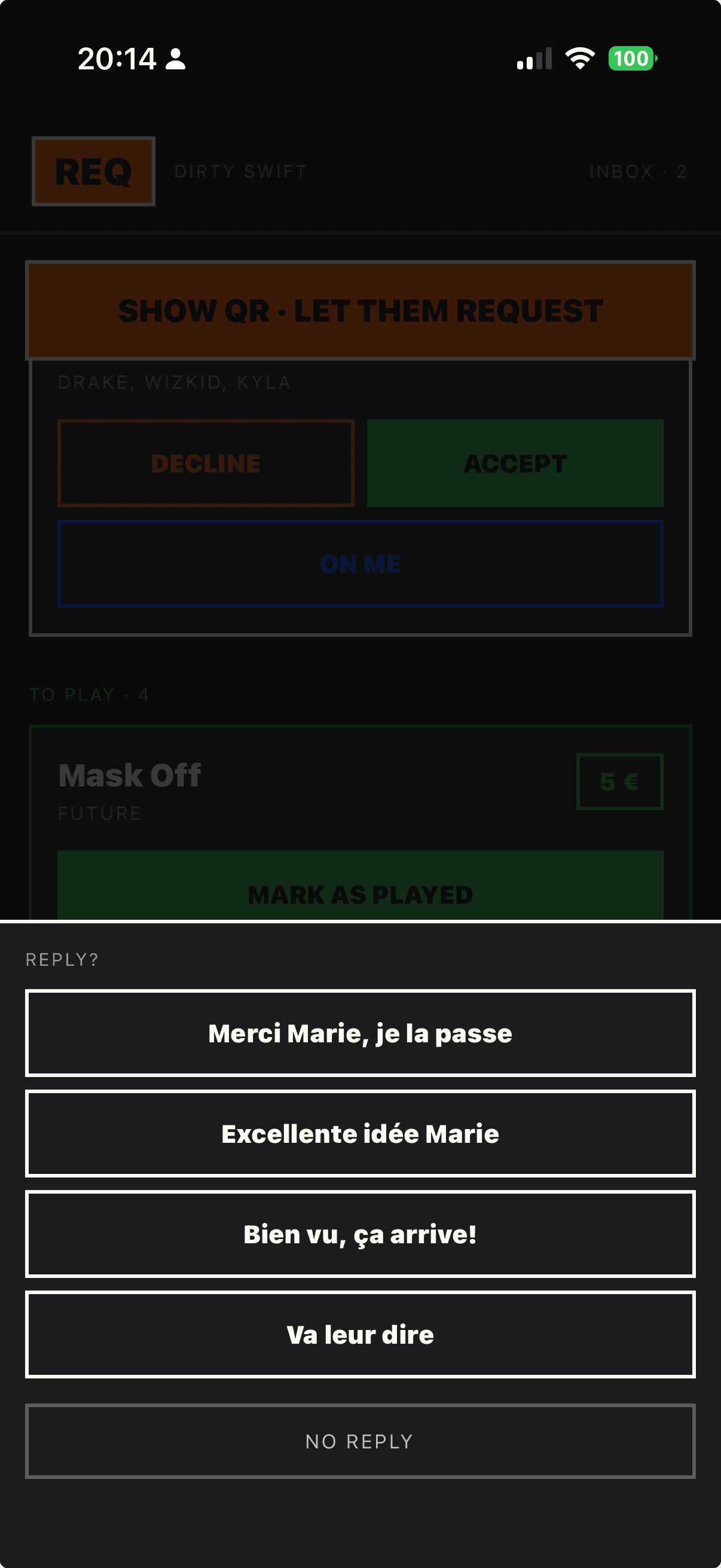
The moment you decide, a sheet slides up with your phrases. You tap one, it goes. The person watches it appear on the page still open in their hand, without refreshing anything. They know someone read it, and they know what happens next.
The status page watches for your reply for 10 minutes after the verdict — long enough for a DJ mid-mix to find two seconds.
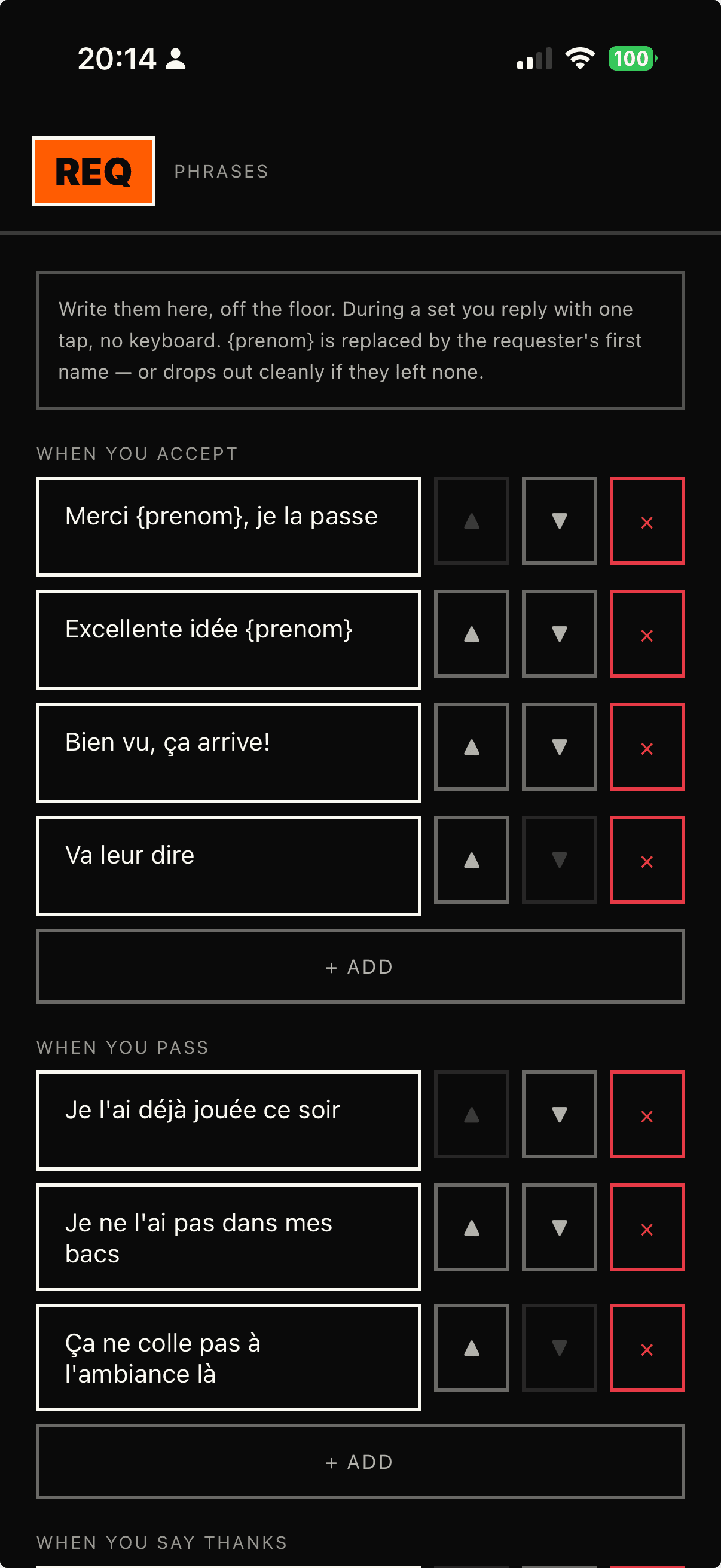
You write them before the night, in your own words. Three moments: when you accept, when you pass, when you say thanks. Put {prenom} anywhere and the first name drops into place — and if they left none, the sentence closes cleanly instead of showing a hole.
Eight phrases per moment, 80 characters each. Reorderable, deletable, and never forced: you can always send nothing.
A third button next to accept and pass: on me. The track joins your "to play" queue exactly as if you had accepted, but the authorization is canceled. Their card is never charged, and their screen announces a gift — not a rejection.
Nothing to refund, nothing to claim: the authorization releases and the money never left the account.
in the wild
A DJ, her crowd, requests coming up and answers going back down. See how it plays out in the club.
you're a DJ?
REQ doesn't turn your booth into a toll gate. It's a channel: the request comes up with a name on it, your answer goes back down in one tap, and you're the one who decides whether it costs anything.
Powered by VYBZ. Need more bookings? Put your profile on VYBZ.
vybzdj.comNothing plays without your yes. Accept, gift or pass in one tap, no negotiation in the booth.
On a track request the card is only authorized. You play it, they're charged; you gift it or pass, they're not. The price is theirs. The value is yours.
Paid out by Stripe, straight to your account. REQ takes 20% per request actually collected, Stripe fees included — you keep 80%.
mockup, actual size
new · mac
REQ Booth is a window in a corner of your screen, above Serato. Requests land there live, you answer in one click, and your eyes never leave your mix.
Always on top, no window chrome, placed wherever you want. It remembers its spot from one night to the next.
Track, artist, first name, amount, and the time left to decide.
Accept, play it on the house, decline, mark as played. Your reply goes out to the requester, and a decision made here shows up there.
free · macos 11+ · apple silicon and intel
faq
REQ is a request management tool for DJs. During a set, the crowd scans a QR code sitting on the DJ booth, asks for a track from a web page — nothing to install — and puts an amount on it, along with a first name if they want to. The request lands on the DJ's phone, who answers in a single tap: play the track, play it on the house, or pass. The answer appears on the status page the person kept open.
Yes. On top of accepting or declining, a DJ on REQ can accept and gift: the track gets played and the charge is killed. On a track request the card is only authorized when the request is sent, never charged upfront; if the DJ gifts the track, that authorization is cancelled and nothing is taken. It's the DJ's call, not something you can buy.
Nothing is charged. A track request places an authorization on the card, not a payment: if the DJ declines, or doesn't call it within the time limit, the authorization is cancelled and the money never left the account — there is no refund to chase. On the status page, kept open, the decline shows up with the line the DJ picked whenever they send one.
REQ takes 20% of every request actually collected, Stripe processing fees included: the DJ keeps 80%, paid out by Stripe to their account. A request that is declined, expired or gifted is never collected — it earns nothing and costs no one anything. The crowd needs no app and no account; it all happens in the browser.
Yes. The DJ app is on the App Store and on Google Play, free: download it, show your QR and you are running — connect your payouts whenever you have two minutes, the money waits for you. Your crowd never has anything to install.
Yes, with Serato DJ Pro and with any software: REQ Booth is a Mac window that stays on top, above your mixing software. You connect it once with a code shown in the REQ app, then requests land there live and you answer in one click, without touching your phone. It reads nothing from and writes nothing to your library. Free, macOS 11 or later, Intel and Apple Silicon. Windows: not yet.
out now
Your QR on the booth, requests on your phone, your answer in one tap. Free, no subscription.
iphone · ipad · free
Get it on Google Playandroid · free
On a Mac? REQ Booth, the window above Serato